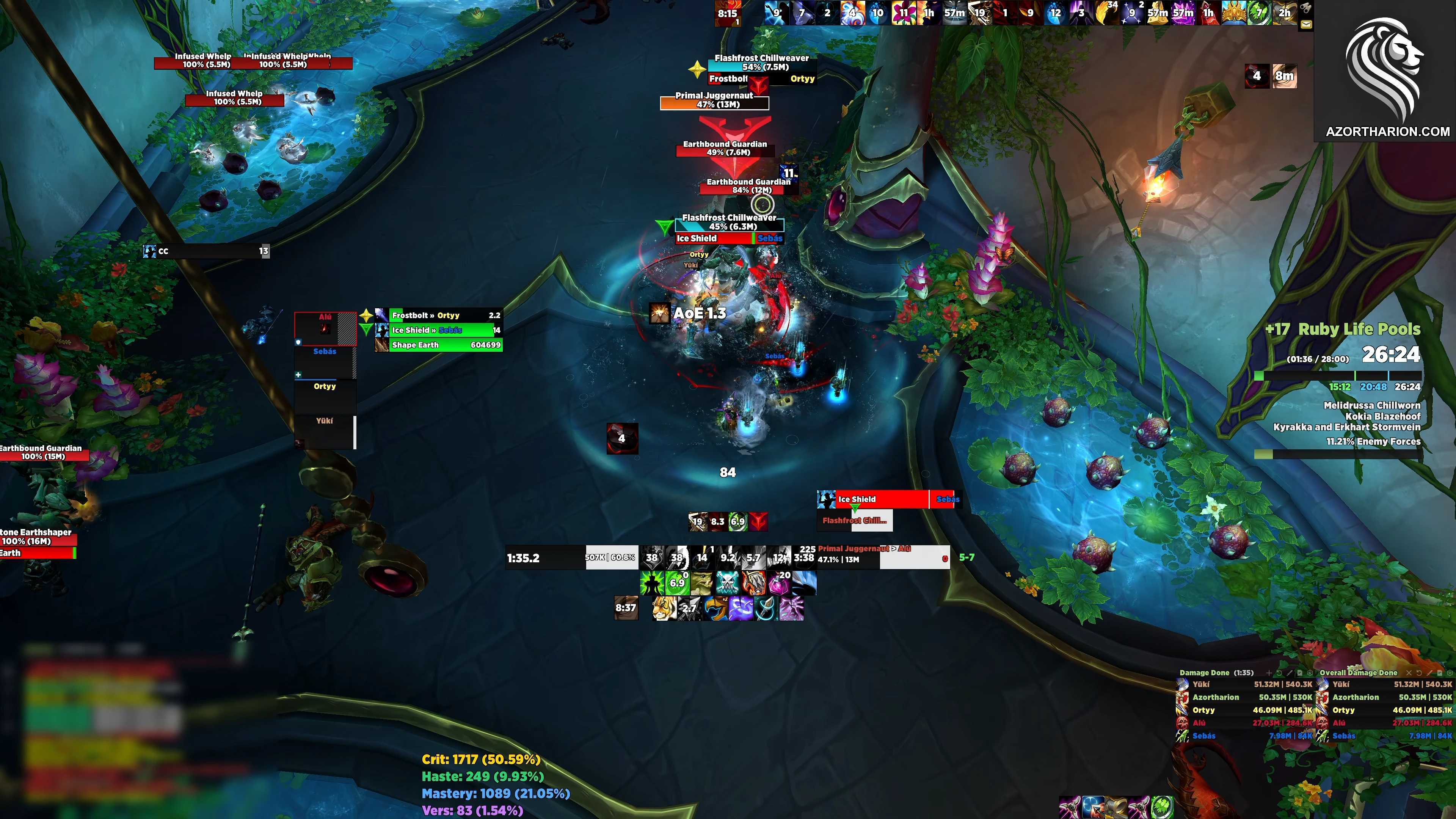
Hero shot. Full screen mid-pull in a Mythic+ key, nameplates, party frames and cooldowns all visible.

AzorUI

Clean, Competitive WoW UI for Hall of Fame Raiding & Mythic+

Optimized for DPS and Tanks

8AddOns
12Import Strings
September 10thLast Updated
5-10 minutesSetup Time

Import Strings

Platynator

CurseForge
Free for everyoneLast updated September 10th
PLATY!1!rVprbCPVFbYTpAWkqqBdqeFRSH+A4MeKpyqKWJwQ2+NHYntjh00lJDP2XNtTxnPdO+Mk3qoi7EL7k/5DULXVJtllN11RKvWxqD9IoVJpRSW6K4RoFwqoqoDyajtTlE1he+5rHvZ4NyyMFNtzH+ece875zj3n3py4uWLZav2BKkFNHZtVq64aqNobLeCaVe8SpFVVo9NS49m23iSqDUMuKZvYrupmtY7bNdUW/RXaaKukiexqDbXUBR13SbKhamjO0tsdQ2/oQMtU26hjqDayVlNt3cTETcMXEHWLuglymHVkFTBpq4ZTZmLpZjMwaSXdIDoyNSeFTNTuuXOekCFZSmqXqFUNaV3gW4eJh/LJ1GQlky9klUzloSteuX6uZuj796tEqy7qGhWZLXsr8Z/b2DN/tdXCi1XOzOjRxXriVW/JUoGq2DR6Ja46tQN8oMfGq2mTSS+X5fBVOqWAdriM81cxFv7aGMGqiRDI7VTqIHifTZY2744lQSGa0iG4oRuoFFCskP+dx+nzRJRJ6XRlARELmuKKhiy9aVqrSrXetWzcXs+19GbLgD/bWs5bHVTXVeMelVjLKTY9nqI6tZYVTtNaSTEWh7Nq18ZlfT/S3HQL0elbiXffVJ7atf9NJisflgbNtTA5mL6nWKkUZ2JbE1/hgqZA/XZrK/HvPZ3VVy7dk2LLjiT6jwZ7OFE2rJ/oDknsI0qqs5ZsYNNeU3DXNnQTuWmrpWp40UmploXssoLtltoeL6iE4MXxOcMmatIyuk1X6mhXskaXr7RV8gC0HDiSEjp+70X6/ClVxwYmq5O1+GQzPkniUpwcF2c6la5s/vnpES7wt7vIsjnnOe4hN7Gm3dIPU4baQ2TUYyIccRgTuebLGfkkUXWNU68I6pLubtbFiadstGRbB9aL1PP2tZC5Dy8mMbLcjE26JsWJI/mRM4nFjzcnm/yrxr44lZFMW13aF1J0jpprik60Dq6kGQVrmQmWrxsgFe+SPYfSNuAFacBkK/HXH9LnR5NN/2fN+8lIiNFy9qpioi7YygCdxLhOlBa2bIADb4lBS0YC1xvEgZMhSK3TEDbgOqx7ug79NoSTAoAypQIYzPRUqlBJzQoMHPXUw8xRi4cHCf34yuSzAh4g+SaZd5y8LOYpM1ZOC5nHC15IOB8oN/fEBmDJEcShEN8GeqYqxVJs84WNAOYEtCWc/sWhug14M1pbG+McIAGK0VB0v2goSrNIeRSQR+Bwh8TAOTAYMNQRGfWGUOZay06EqEZiLwDQ7cOvFoIfiYRf/EJhV4uEHTkn7NZ82AlVxHzY0ZYYtARgR2J8UK5rhrG4lXjjZvbArGhMSoeMgKTciQKgOxrVOIjEvjAaAUnPV05eBsx9XJZSNNMYAsqHj3HKa5Nq3A8KQZ/IlWBS787xWztLEpOc4bLAUzxtARwZ6vxokeapQpA6WO2D118/Cw91i9bb71KLvfrqq7TlC+CYamBIBHyGZxI3nn1NBtQYZxDnDO4VDMo20cFFxmcRhSkSzATRPl6OlCHAbH2o7uLhldzuraSfuFyYWBAjnm3jroUwyDSjm3Wjq6EKU6YbDKAPPTkDg8rQwFHiClIHYtdLZYoQ8/B+Gu6+w+Xu4EVEuHCzUgu4YY9P6aRuoFxDX0LalIgYYK9r2EOd/p1vsAcUKun+l0dkHr8P/jyr6QQxHKRmaZLqBfgsjRblRdC0k6UBpMzd3dDbuj12jfTeDHgvm7c5t7Rjhk2xkWqoNQM5CuSKNljocBqZRG0iJ6/poAqD9bpZyCExgdTWdrIaaiDT0heQU5SoTRPc/ibuOhlKs9LrIFeYiDGZwl3ThkhuutOsH2PD1juWw0PdSrYu+w8rC7qlU2mkzdj8NOHYtwYQKtZ/ZyzNdhhrTc6ThNzoGbA9PXrfDe5zj0ofUTqqpkEVsZV4hu9j3JK1bqNhKRasHPpWeCTSurzAgZDEPFpzfuabhW3Z553gmY3po6SaGmrrdakzKUtMmi3P8w9uufJLO8Ja9E3vSntLW64EzKY0uI38XPmDE3v/+cg1J3ixoCG2Vs+A5zCOO5DfCLxF20yaxp8ujTZs2wytN7sx+lS/229TwTJOBDQ0YOeQLt2o7PzUR5vKstSsrx/pOXIDwouAadMm2JDaPyRVfi5dSqUNySSG6DJSU5mN+FDVevzOkwJOjF7KaqyhKWB+Ytsp4MTFosIalgJO3PbBLho3fYrOF1KNHTieVmvgIrWVwEZ1x/qP6e74+8ce+4nYHRPPbtD4++GDD9KWcLyeZPPHYXNHimrq7UCiLpwqXcNEQ2QtuPmKfVC6Rnh/usXbnwIp2feezPEziSKU9a5Mo5KW2qCFypm7b//FL+nG8PzOneOxWJzmePedfl1ZVIkJTsyStGevvTZx9uyndNTp06/F2ChYVCJxP/xUcKMB6H+A5Yqll07SZX/9V78GOndtbDyXA/1BIKeuxUidOnXqb0I397/xFmX23U/OTtMdEMRh8jpFeCs2GhWgyRpckYi0aAKWpawsuhJnxjsIYa/DE8/DCjLpDqMdTtawZbmpNjIQGL6uWoAhV4HsYQF2YzdDT0rYCEGKj2cL+/KjP6DLf+/0aZb4cLk5oeFKFBwYgdpbf6eLLp96merut5dfDuNGJGs6Ys8LL/yRkvjNVVcxZQOJKx5/wpPp/IbgOQcydBvR6LGXngX1ppgEk8ai2rOGaezzJeTBOniIngJ18ZARwTp5yJBApuzVAqGkHob1NreCutlmaTBYUfTVA7zaO8SxljSxiXI1iDRNArFWWw0EgLvWQVtn9pw48QzYmn3V2FeO24J5M6eSKmND13INDLGSkRHUUzOQDulczy3Im+yWjN45ggDkkBJVcGz9c8aJW6PihFe6HUrByrX+I4uCboInkW7HnqW93uBi1/R6KMr8ww82rdzXTR3Ss1+SAsS3TRa1WV7LjmTiFC4jBw5Ce96jIHvoaKXeUk0TGX4Lr3Apze2bbHr9CHMEOn+YmUJbyvU+l2HmK3ryzjAxVvoMQ3XKx2fBCuimpoEX/SOFgTrw5fmL/VOW/lzzM5T9A5TvUC45z1HiZzsz5DnII8e9ctcN+elIoUEn2zNdmgkZSLnOGr/hOuvGwDne+8/RnPn5WXokrDf0OmSVab0JVbc1Eq6rh6R1fvVRfmlzKhbE0V6WByNSR6Zd7rVr2HCnafkBotFwaR3IdXgnFCYZurcbXRsNHJE4gVJ+sNC/KPJMZLn/kE9KFj5TiKwi4seYBFkfAO4w7fq8B7QxNnEjYzhDvbZMK65IjmxBrLw4FmDCWkUtOHDwepLXOOH0PGiGpznnHOXMy99+tiWOOn+/do8NnFz2Mx7AQURWfccMJNUhBw7YSwGtEhuZyUKxkJodvOOIM4HFDcksv6OogoTw1QYfsQ6uCcly/tWHk6kT2HyJrj4Es83dqk3zUchKewYaOLxZk8gTGW0kne8H6OQ1ZCyg3Wx/n+a/eXqR4y80SZhmvaK9wF9kApHjr/Tn+UT6kCfo0UsDHzJNbIdWF3VknJNKM4zloncSIjR6b93AFrzZGNRNEDKrSGsiyy3CEBtgb1Qhq4RwE+NmCKtqr5js31g5s97vagfzdHPKxp2SuFwSlkPa0Tl2XVf2FjbFMuMBVRTYsNJCqcQcb6A/z/qHTJ7mKQbvjVKNONPwyEeO6RN0gIu4gIyay+8kB+Vil5Gicjwy9r8VfvawoojTqWUFLYkfolSP6Br75EKmHbkytmP0BvfK2M7DH8Jn/Hf3wefodWn4vOjtEfjccduz7tin/aQPwYTjX4oPZ7DCBwCt9y/yhv0UiH71YsrsL9+ibN7b5bHc+bUXPSEoS489E44LNFrquKFiO0oLZy9EC8ekYNsRiQtDBYtdkKHmx/yLYu+auGpBCTwyBP9FiRZRLq3mOwudrCDipHkR6WagcR8mhubMjzFwBpKzqq23ERTWW4k/iFtVVdOwydNOU7UxybNgX60vQA0NWu4SAtG0akGUzshkYlrcTodBPw1JUg3iAo+6pYH7fZrizV8duIeWkK82IALR3G9gvVFX272txMevsPA3C+uAKFSF+rWJ5L8WsBlUOef4V4D5K4df2bvFvrv24wU5boZf098bfle6oBFdNd0yI97XKDjm5ZxCacrZGyZQQrZbCMyl76XAewXbqO16UvCA5ObkCMiE84HRbjlMnc/+Pw==

EllesmereUI

CurseForge
Import StringsLast updated August 29th
AZT2=fake000nOtaReAlImPoRtStRiNgxxxxSuBoNlYpLaCeHoLdEr00zZqWfake111nOtaReAlHaShyYyYblUrReDoUtxxxx222fakefakefake

AzorTools

CurseForge
Import StringsLast updated August 29th
AZT2=fake000nOtaReAlImPoRtStRiNgxxxxSuBoNlYpLaCeHoLdEr00zZqWfake111nOtaReAlHaShyYyYblUrReDoUtxxxx222fakefakefake

Blizzard Edit Mode

Built into the game
Import StringsLast updated August 22nd
AZT2=fake000nOtaReAlImPoRtStRiNgxxxxSuBoNlYpLaCeHoLdEr00zZqWfake111nOtaReAlHaShyYyYblUrReDoUtxxxx222fakefakefake

BigWigs

CurseForge
Import StringsLast updated August 29th
AZT2=fake000nOtaReAlImPoRtStRiNgxxxxSuBoNlYpLaCeHoLdEr00zZqWfake111nOtaReAlHaShyYyYblUrReDoUtxxxx222fakefakefake

Northern Sky Raid Tools

CurseForge
Import StringsLast updated August 29th
AZT2=fake000nOtaReAlImPoRtStRiNgxxxxSuBoNlYpLaCeHoLdEr00zZqWfake111nOtaReAlHaShyYyYblUrReDoUtxxxx222fakefakefake

ExBoss

CurseForge
Import StringsLast updated August 29th
AZT2=fake000nOtaReAlImPoRtStRiNgxxxxSuBoNlYpLaCeHoLdEr00zZqWfake111nOtaReAlHaShyYyYblUrReDoUtxxxx222fakefakefake

Mythic Dungeon Casts

CurseForge
Import StringsLast updated August 29th
AZT2=fake000nOtaReAlImPoRtStRiNgxxxxSuBoNlYpLaCeHoLdEr00zZqWfake111nOtaReAlHaShyYyYblUrReDoUtxxxx222fakefakefake

PlateTweaks

CurseForge
Import StringsLast updated September 10th
AZT2=fake000nOtaReAlImPoRtStRiNgxxxxSuBoNlYpLaCeHoLdEr00zZqWfake111nOtaReAlHaShyYyYblUrReDoUtxxxx222fakefakefake

Blizzard Cooldown Manager

My Cooldown Manager layouts for each Hunter spec. Import these as well as EllesmereUI, not instead of it: EllesmereUI lays the bars out (which button goes where), the CDM profiles tell your game which buffs and abilities to track at all, so both are required.

Beast Mastery

Built into the game
Import StringsLast updated August 29th
AZT2=fake000nOtaReAlImPoRtStRiNgxxxxSuBoNlYpLaCeHoLdEr00zZqWfake111nOtaReAlHaShyYyYblUrReDoUtxxxx222fakefakefake

Marksmanship

Built into the game
Import StringsLast updated August 29th
AZT2=fake000nOtaReAlImPoRtStRiNgxxxxSuBoNlYpLaCeHoLdEr00zZqWfake111nOtaReAlHaShyYyYblUrReDoUtxxxx222fakefakefake

Survival

Built into the game
Import StringsLast updated August 29th
AZT2=fake000nOtaReAlImPoRtStRiNgxxxxSuBoNlYpLaCeHoLdEr00zZqWfake111nOtaReAlHaShyYyYblUrReDoUtxxxx222fakefakefake

These three are Blizzard's own profiles, so they go into the game's Cooldown Manager. Type /cdm, open the dropdown at the bottom left, press Import and paste the string.

Blizzard exports one profile per spec, so import each string while you are on that spec. After that, do not press "Repopulate from Blizzard CDM" in EllesmereUI. It wipes the layout you just imported for the spec you are on.

Subscribe to my Twitch or Patreon and get the roles on my Discord, then Log in with Discord below to open up access.

When you log in, Discord may ask you to verify your account with an email or phone number. There is nothing I can do to make this bypassable.

The login reads your Discord username and your roles on my server. It cannot read your messages or change anything on your account.

What AzorUI Is

AzorUI is me, Azor's, UI. I've been playing the game at a top level for over a decade and have always been big into the UI side of the game. This UI is what all those years of experience has turned into, all optimized around max DPS, not dying, and seeing everything clearly so you can be the best possible WoW player.

The UI consists of 8 AddOns. Here is what they each do:

My UI Philosophy

I have developed some strong opinions about a good UI over the last 12 years, which this UI embodies:

Installation

Get the AddOns, import the strings in order, then check it in game.

Before you start
  • Make a copy of your current WTF and Interface folders somewhere safe.
  • Delete every AddOn in Interface/AddOns.
  1. Install external files

    Not required, but recommended if you want everything to look exactly like mine. Do not launch the game yet.

  2. Get the AddOns

    Install the AddOns first and /reloadUI before you import anything.

    AzorTools is on CurseForge like the others, so an AddOn manager can install it and keep it updated.

    ExBoss requires a second AddOn called EXCore, which is not included by default.

  3. Import EllesmereUI first

    EllesmereUI is the most central AddOn of the UI, so I recommend you start there.

    Turn off the EllesmereUI Nameplates module in /eui. Platynator draws the nameplates instead. If you skip it, you will have duplicate nameplates showing.

    EllesmereUI lets you select which Modules you want to update when you import, and unfortunately, importing the Mythic+ Tools module also replaces your own saved best dungeon times. Untick Mythic+ Tools in the import window if you want to keep them. Unticking also means you won't get its position and settings, however, so you may want to take it on your first import and untick it after that.

    Note that profiles are per-character. When you log an alt, you'll need to enter the config of each AddOn (see per-AddOn import steps below) and set the AzorUI profile up. Once you've done it once per character, it's set forever.

  4. Paste in the rest
    Per-AddOn import steps (9)
    • EllesmereUI

      Type /eui, open Profiles, choose Import Profile, paste the string and press Continue.

    • Platynator

      Type /platy, choose Import, and paste the string.

    • AzorTools

      Type /azt import, paste the string and press Import. /azt undo reverts it if you change your mind.

    • Blizzard Edit Mode

      Import the layout in Edit Mode, then activate it.

      Import the layout in Edit Mode, then activate it. It is not in use just because it imported, and the first time you switch spec you may have to pick it again.

    • BigWigs

      Type /bw to open the BigWigs options, and paste the string into its import box. Then open Auras and tick Disabled yourself. BigWigs has a bug where the string does not carry that setting, and if you have double debuffs right now, this is why.

      Install LittleWigs as well. BigWigs handles raids and LittleWigs handles dungeons, so you want both.

    • Northern Sky Raid Tools

      Type /ns and paste the string into its import box.

    • ExBoss

      Type /exboss and paste the string into its import and export page.

      ExBoss installs several other AddOns, and most of them belong to a separate addon called ExwindTools. In your AddOn list, tick only ExBoss, ExwindCore, EXBossData, EXBOSS-Locale, EXBOSS-LocaleBase and both voice packs, EXBOSS-ENG and EXBOSS-EXWIND. The rest are ExwindTools modules that have nothing to do with this UI, you should disable/delete them.

    • Mythic Dungeon Casts

      Type /mdc, find Import / Export, press Import and paste the string.

    • PlateTweaks

      Type /pt, open Import / Export, paste the string and give it a name under Import as.

    /reloadUI after each import.

  5. Check it in game

    I recommend Follower Dungeons for M+ or LFR for quick UI testing in relevant PvE scenarios. Screen recording is great too so you can look back at it and make adjustments and fixes - that's how I built this UI in the first place.

    EllesmereUI sets the UI Scale itself, so the slider in the game's own Advanced Options won't do anything. Change it in /eui > Global Settings > UI Scale instead, and do that before you start dragging frames around by hand.

The strings are further up the page.

Get the Strings

Other AddOns I Use

These are other AddOns I use. None of them needs an import string.

Mandatory
  • LittleWigs

    A plugin for BigWigs that covers dungeons.

    CurseForge
Recommended
  • Simulationcraft

    For simming yourself, of course.

    CurseForge
  • Talent Loadout Ex

    An excellent talent loadout manager.

    CurseForge
  • BugGrabber + BugSack

    You need both of them together. Handles AddOn errors, very good for troubleshooting.

    BugGrabberBugSack

Updates

EllesmereUI Tutorials

EllesmereUI is Ellesmere's AddOn and these are his own tutorials for it.

FAQ

Can I change things after importing?

Yes. Once it is imported it is a normal EllesmereUI profile, so anything in it can be changed in /eui.

How do I import a string?

Copy it, open the AddOn it belongs to, and paste it into that AddOn's import box. Each one does it slightly differently, so the exact steps are in the install section.

How often do you update these?

I update them whenever I find something to improve, no matter how small. The UI is never done, I am always looking out for new things you can do with AddOns, new AddOns on the scene, looking at streams of top players and getting inspired, and so on. Most updates cluster around patch drops, but sometimes I'll do big changes in the lull of a season if I find a big improvement. It is the UI I use myself every day, after all.

Why does mine look different from the screenshots?

A whole element missing means that AddOn is not installed or its string didn't import. Everything present but in different places is a resolution or UI scale difference. The UI is built on UI scale 0.5333(333), which can be set in /eui > Global Settings > UI Scale (click the cogwheel). If you're still unsure, ping me in the support channel on my Discord.

What resolution is this built for?

It was built on a 27" monitor with 0.5333(333) UI scale, which is the default UI scale for 1440p monitors. I play on 4K personally. It will work on any resolution, but you may find things look a bit small on smaller monitors than 27", especially laptops. Not a problem, just /eui > Global Settings and increase the "UI Scale" until it looks good. You may have to move things around slightly in Unlock Mode.

How to change Power from a number to a Bar?

Open /eui, go to the search bar and enter "Fill Color". Follow it to the Class, Power & Health Bars section. Set Border Size to 1, then raise the Fill Color opacity slider, which starts at 0 because I like the number on its own. Set it to whatever color you wish. Move in Unlock Mode.

Where did Edit Mode go?

EllesmereUI draws most of the frames now, so Blizzard's Edit Mode does not move them any more. Type /eui and use Unlock Mode instead, which is where you drag anything the UI draws. There is a video for it further up this page.

I already have this installed. How do I update it?

Import the new string over the top of what you have. Untick everything except the parts the changelog lists as changed, and EllesmereUI keeps the rest of your current settings. It saves under a new profile name, which is normal, and your old profile is still there if you want to go back.

What is the alert sound when I stand in something?

That sound is from ExBoss. It has its own version of the GTFO warning built in, so if you also run GTFO you may hear both. You can use either.

Why this setup

It is the setup I actually use every day to play Hunter at a top level. If there's a problem with it, I will usually be the first to notice and it gets fixed that same day.

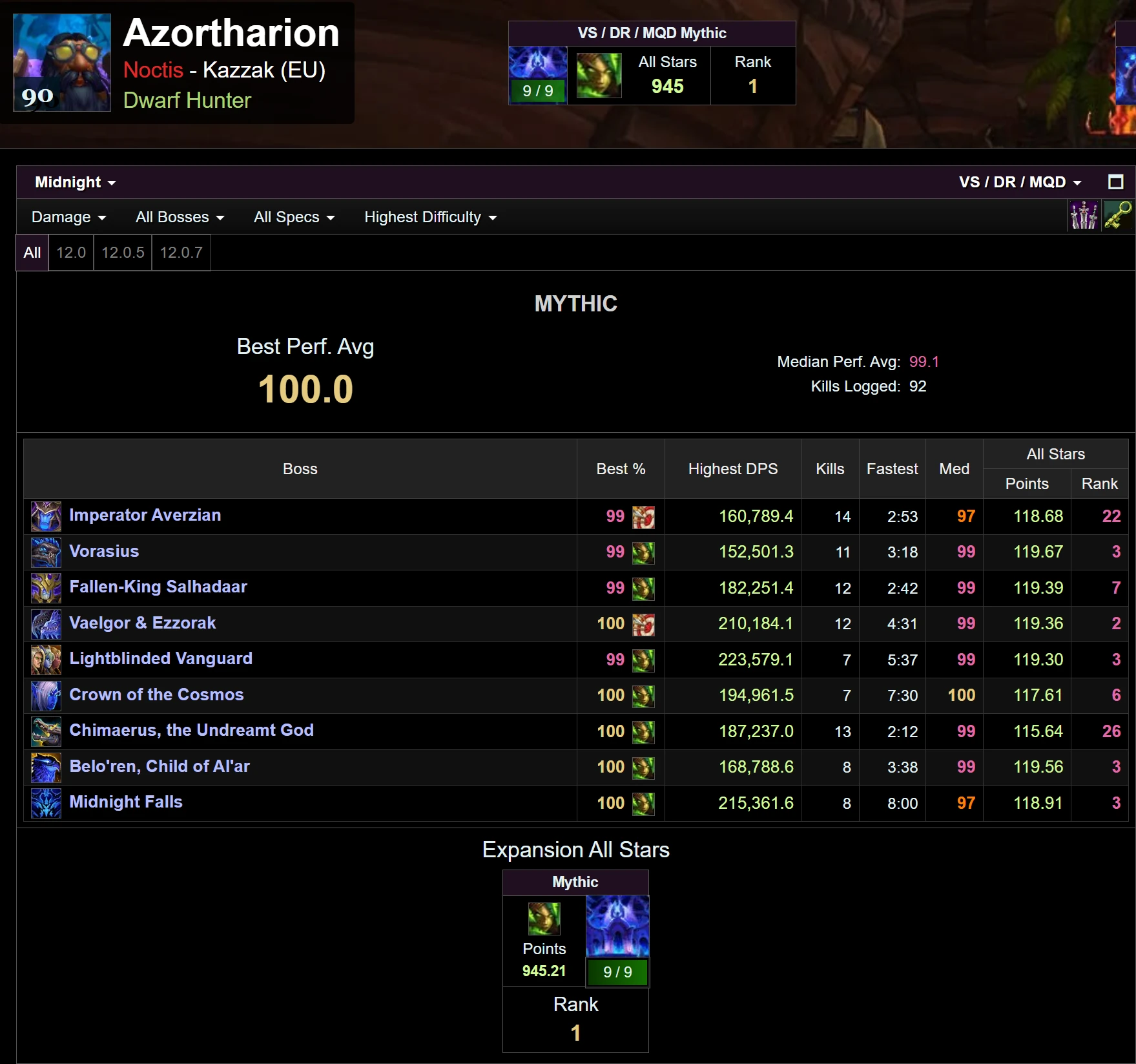
My raid logs

Here are my raid logs for the last tier, just to show at least what is possible using this UI.

Warcraft Logs profile for Azortharion on Kazzak EU: All Stars 945, rank 1, 9 of 9 bosses on Mythic, best performance average 100.0, median 99.1, 92 kills logged.